
Application
Manager
Application Manager automates third-party application patching across a curated enterprise catalog, handles no-code packaging for business applications, and delivers staged deployments that target existing Entra ID groups.
Use it standalone. Or layer it on top of your existing Microsoft setup.

We manage 3,000 devices across 60 offices from one platform — without an army of admins.
Your single place to keep software current at scale
Automate third-party updates, package business applications with no code, and orchestrate safe staged deployments — all while keeping Intune at the centre of your endpoint strategy.
- Automate third-party patching across a curated catalog with staged deployment
- Detect missing or outdated apps automatically with an endpoint agent — no manual checks needed
- Package and deploy business applications using no-code recipes
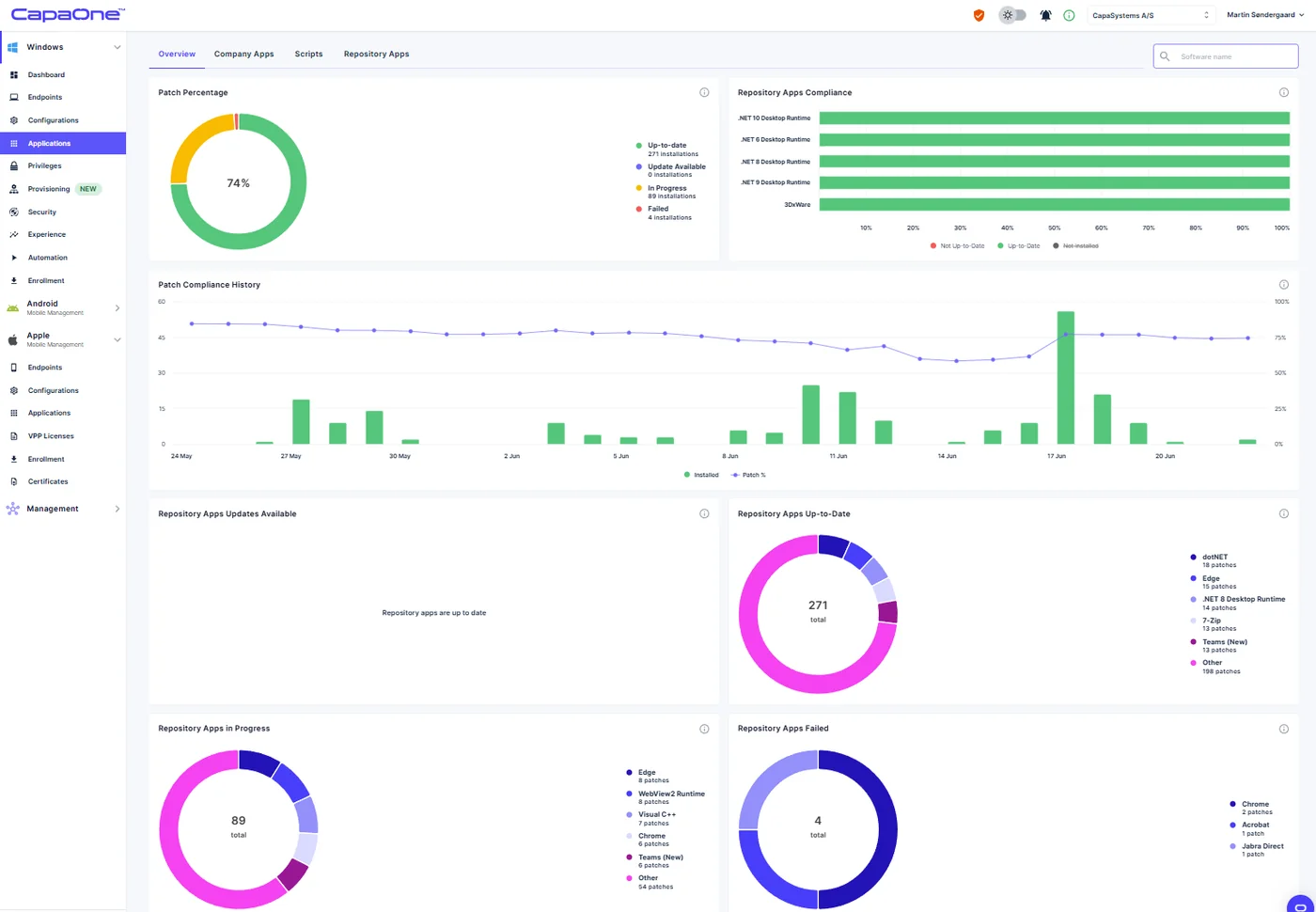
- Gain real-time visibility with interactive dashboards showing update posture, version status and endpoint health
- Prove compliance with exportable audit evidence at a glance
- Extend Intune by targeting Entra ID groups and honouring your existing group structure
Built to do the heavy lifting
Catalog & Auto-Updates
Subscribe endpoints or groups to silent updates for common enterprise apps — browsers, runtimes, productivity tools and utilities — from a curated, actively maintained catalog.
No-Code Packaging
Drag-and-drop installers with detection rules and prerequisite checks. Package any business application without writing a single script.
Intelligent Workflows
Schedule and automate deployments with conditions, ordering and dependencies — predictable timing, zero manual effort.
Prebuilt PowerBricks
Essential actions ready to use — stop services, set registry values, copy files, create shortcuts. Add your own PowerShell for advanced scenarios.
Pre & Post Actions
Automate the steps around each install — close apps, clean up temp files, configure settings — before and after every deployment.
Readiness Checks
OS version, disk space, and battery checks confirm endpoints are ready before deployment starts — preventing failed or unstable installs.
Edge Delivery Network
Globally distributed content delivery accelerates software updates for remote and branch-office devices — minimising latency and maximising reliability.
Auditing & Evidence
Endpoint-level deployment trails, who/what/when dashboards, version-status posture metrics, and CSV exports for auditors.
How it fits with Intune
Already running Intune? Application Manager layers on top — Intune stays your source of truth while CapaOne handles the third-party packaging and patching Intune doesn't cover.
See It Live- Keep Intune as your source of truth. Application Manager complements enrollment, compliance, and config profiles — no complex integrations, no disruption.
- Target with Entra ID groups. Keep your existing scoping and RBAC intact.
- Publish through familiar channels. Package once and distribute alongside your existing Intune workflows.
- No rip-and-replace. It complements what you have, handling the third-party packaging and patching Intune does not.
Close the gap attackers target most
Third-party applications are the most exploited attack vector on managed endpoints. Application Manager closes that gap automatically.
- Reduce attack surface by closing third-party application vulnerabilities quickly and consistently.
- Protect endpoints from ransomware and exploits by automating third-party patch management.
- Automatically detect outdated or vulnerable software before it becomes a security risk.
- Demonstrate control with standardised software baselines and audit-ready reporting.
- Developed and supported in the EU — ensuring GDPR and NIS2 alignment and European digital sovereignty.
Outcomes your team will notice
Fewer tickets
Consistent versions mean fewer "works on my machine" escalations reaching the helpdesk.
Lower TCO
Automate packaging and eliminate duplicate tools — same outcome, less spend.
Faster to value
Deploy apps and updates in minutes, not hours. Same-day setup, no steep learning curve.
Better employee experience
Predictable, quiet updates on a schedule users can see — no unexpected interruptions.
Non-specialist friendly
Any admin can take control quickly — no scripting knowledge or external consultants needed.
What "done" looks like
- 01Close critical third-party application vulnerabilities within hours of release across the fleet.
- 02Maintain near-universal compliance on core applications week to week.
- 03Reduce manual packaging work dramatically through reusable, no-code steps.
- 04Cut app-related support volume with standardised versions across the estate.
- 05Empower non-specialist IT staff to handle packaging and updates without external consultants or scripting knowledge.
Live in five steps
Most teams are fully deployed the same day they start.
Connect & Discover
Install the lightweight agent, sync device inventory, and surface your current application landscape.
Define Standards
Set the approved apps, versions and baselines per department or site.
Test Stage
Roll out to a pilot ring and confirm installs complete cleanly with real-time outcomes and guardrails.
Promote to Production
Stage the rollout to the rest of the estate with throttling and deployment windows by location.
Report & Prove
Export posture and compliance evidence on demand — scheduled or on-the-fly for auditors.
Explore the rest of the lineup


Which applications are supported for automatic updates?
A broad, actively maintained enterprise catalog — browsers, runtimes, productivity tools, security software, and utilities. Business apps can be onboarded with no-code packaging.
Can I control rollout speed and target by group or site?
Yes — use test/production stages, Entra ID groups, and scheduled workflows. A globally distributed edge architecture ensures fast and reliable content delivery.
How do you detect whether an endpoint needs an install?
Automatic and flexible detection via the endpoint agent. Compliant endpoints are skipped; non-compliant endpoints are remediated.
What happens if an install fails?
Automatic retries with backoff, detailed logs in dashboards, and the option to uninstall versions if needed.
Can I package apps without scripting?
Yes — use prebuilt PowerBricks for common tasks. Add your own PowerShell snippets for advanced scenarios if needed.
How does this integrate with Intune day-to-day?
Keep Intune for enrollment, security and policy. Target Entra ID groups, reuse existing group structure, and publish alongside existing Intune applications.
What compliance reporting is available?
Real-time posture by app and endpoint, version-status dashboards, update coverage metrics, and exportable CSV evidence for audits.
How quickly can we start?
Typically same day — install the lightweight agent, sync inventory, set baselines, run a test deployment, and then promote to production.
Ready to get started?
Consolidate your endpoint application operations with CapaOne — standalone or with Intune.